Technology
If Apple Sends You a Push Notification Alerting You to a Spyware Attack, Take It Seriously
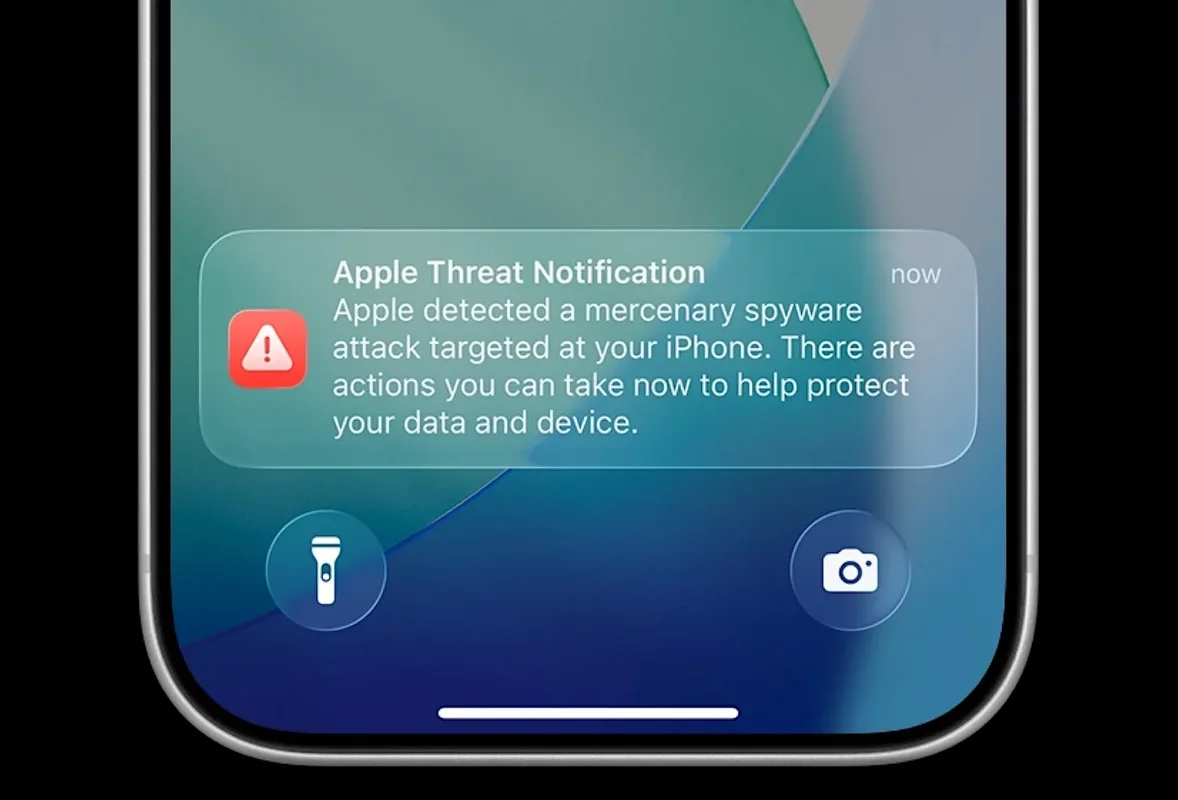
Apple has sent a fresh batch of threat notifications to iPhone users it believes may have been targeted by mercenary spyware. The alerts, which now appear as push notifications on the Lock Screen and in Settings, urge recipients to take immediate protective steps. Security researchers and Apple itself emphasize that these warnings should be taken very seriously.On Thursday, Apple notified users in 110 countries. The company has now issued such alerts to people in more than 150 countries since it began the practice in 2021. These notifications are rare and typically aimed at individuals who may be targeted because of who they are or what they do—such as journalists, activists, politicians, or diplomats.What the Notification Looks LikeA genuine threat notification reads something like: “Apple detected a mercenary spyware attack targeted at your iPhone. There are actions you can take now to protect your data and device.”Apple delivers the alert in multiple ways: a push notification on the iPhone Lock Screen and in Settings, an email from threat-notifications@email.apple.com, and a banner that appears when the user signs in to account.apple.com. The company has updated the user experience to make next steps clearer.Importantly, a real Apple threat notification never asks you to click a link, open a file, install an app or profile, or provide your Apple Account password or verification code. If a message claiming to be from Apple does any of those things, treat it as a potential scam.Why These Alerts MatterMercenary spyware attacks are highly sophisticated and far more advanced than ordinary malware or cybercrime. Tools in this category, such as those historically associated with companies like NSO Group, are designed to compromise devices with minimal user interaction and are typically deployed against specific high-value targets.Apple relies on its internal threat intelligence and investigations to detect these attacks. While the company notes that absolute certainty is never possible, it describes the notifications as high-confidence alerts that a user has been individually targeted. Receiving one does not automatically mean the device has been successfully infected, but it indicates a credible attempt that warrants immediate action.Citizen Lab researcher John Scott-Railton highlighted the latest round of notifications and stressed the importance of seeking expert help. He noted that these alerts can serve as a critical signal that helps uncover broader targeting campaigns.What to Do If You Receive a NotificationApple strongly recommends the following steps:Enable Lockdown Mode immediately. This security feature significantly increases protections and makes successful spyware attacks much harder.
Update your devices to the latest software version to receive the newest security fixes.
Use a strong passcode, Touch ID, or Face ID.
Enable two-factor authentication and use a strong, unique password for your Apple Account.
Install apps only from the App Store.
Avoid opening unexpected links or attachments.
Most importantly, seek expert assistance. Apple directs recipients to the Digital Security Helpline run by the nonprofit Access Now, which provides rapid-response security support 24 hours a day. Forensic analysis by specialists can help determine whether a device was successfully compromised and what further steps are needed.Broader ContextThese notifications underscore the ongoing reality of state-linked or mercenary spyware targeting. Apple does not attribute individual alerts to specific attackers or regions, and the vast majority of users will never receive one. For those who do, the combination of technical recommendations and expert support is designed to reduce the risk of data compromise.The improved delivery of the alerts—as push notifications that are harder to miss—represents an effort to ensure targeted individuals notice the warning and act promptly.
Comments (0)
Please log in to comment
No comments yet. Be the first!