Technology
macOS Tahoe Review 2026: Is the Liquid Glass Redesign & New Features Worth Upgrading To?
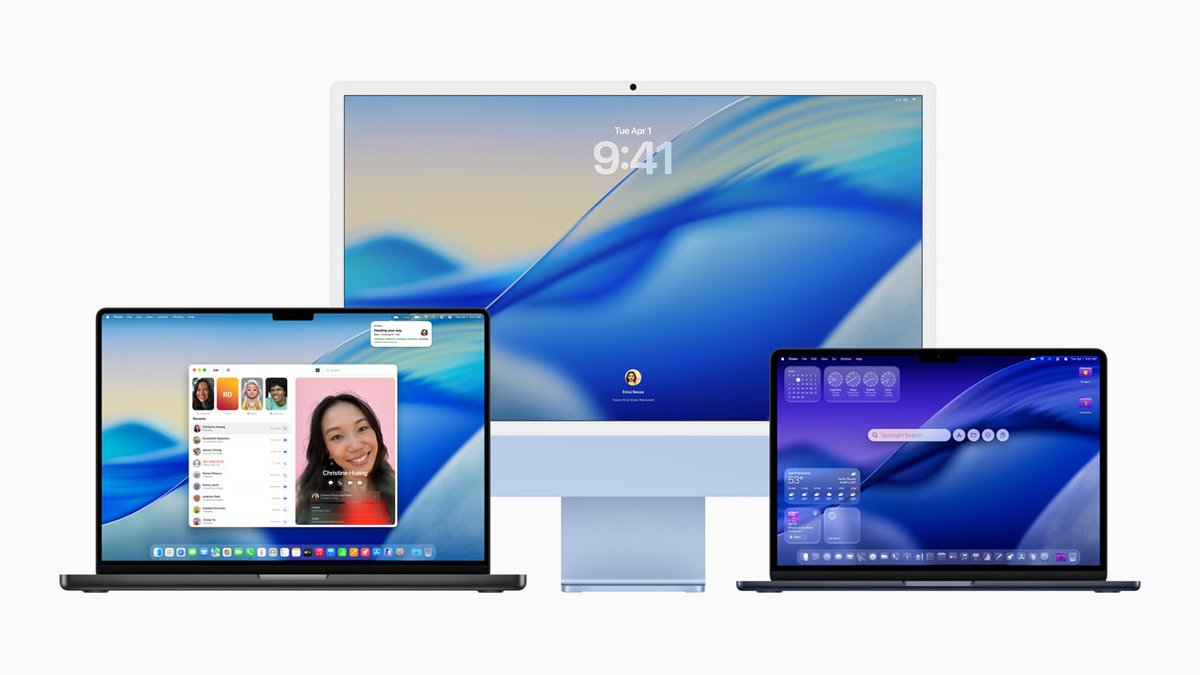
Apple's macOS Tahoe (version 26), released on September 15, 2025, marks a bold evolution in the macOS lineup. Named after the iconic Lake Tahoe straddling California and Nevada, this release introduces a unified yearly numbering system (26 for the 2025–2026 cycle) and delivers what many call the most visually striking redesign since macOS Yosemite. With the current date in January 2026, macOS Tahoe 26.2 is the latest point release, adding refinements like Edge Light for better video calls.The Star of the Show: Liquid Glass DesignThe headline feature is Liquid Glass, a translucent, expressive UI overhaul applied to the desktop, Dock, toolbars, menus, and in-app elements. Icons feel more dynamic with depth, subtle blurs, and personalization options including dark mode variants, tints, and themes. It's fresh yet familiar—apps focus more on content, with rounded corners and fluid animations that make macOS feel modern and premium.Reviews from PCMag hail it as making Tahoe "the most exciting desktop OS in years," while The Verge notes mixed feelings on themes (some tints can look inconsistent). After months of use, the design shines on high-resolution Retina displays, especially M4-powered Macs, but it may feel polarizing on older Intel models (Tahoe is the last version supporting select Intel Macs like 2019 MacBook Pro and 2020 iMac).Productivity Power-Ups: Spotlight, Reminders & MoreSpotlight gets its biggest revamp ever—now a true command center. Press Command + Space to search files, launch apps, send emails, create reminders, or pull live iPhone data directly. Apple Intelligence integration (where available) summarizes content, suggests actions, and auto-categorizes Reminders for better organization.Continuity reaches new heights: Live Activities from your iPhone appear in the Menu Bar, the new Phone app lets you make/take calls seamlessly, and features like Call Screening add spam protection. These make switching between devices effortless—ideal for power users juggling Mac and iPhone workflows.Other gems include:Games app replacement for Launchpad, with Apple Arcade integration, Game Overlay, and Metal 4 for smoother gaming (MetalFX Frame Interpolation boosts frame rates).
Enhanced Notes (Markdown export), Passwords history, and Genmoji/Image Playground updates.
Low Power Mode for extended gaming sessions.
Performance, Stability & Compatibility in 2026On Apple silicon (M1–M4), Tahoe feels snappier with better battery life in many reports. PCMag and MacStories praise its balance—familiar for longtime users yet packed with innovations. Reddit threads show divided opinions: some love the elegance and stability post-26.1/26.2 fixes, while others regret updating due to initial bugs or missing Launchpad (replaced by a new Applications view).As the final Intel-supported macOS, it's a bridge release. Most users on M-series report smooth sailing, especially after point updates addressing early issues like Mac Studio compatibility.Pros & Cons from Real-World UsePros:Gorgeous, customizable Liquid Glass aesthetic
Smarter Spotlight and productivity tools
Deeper iOS/macOS integration (Phone app, Live Activities)
Gaming improvements and Apple Intelligence boosts
Free upgrade for compatible Macs
Cons:Polarizing design (some find rounded elements overwhelming)
Removal of Launchpad frustrates legacy users
Mixed theme results; early bugs fixed in 26.2
Limited to newer hardware long-term
Should You Upgrade to macOS Tahoe in 2026?If you're on macOS Sequoia and own an Apple silicon Mac, yes—Tahoe delivers meaningful productivity gains, a refreshed look, and future-proof features. It's stable now with 26.2 (including Edge Light for low-light FaceTime/Zoom). Hold off if you're on Intel hardware or prefer rock-solid minimalism—wait for macOS 27 rumors.At digital8hub.com, we track the latest in tech trends 2025-2026, Apple gadgets, AI features, and productivity tools. For more on optimizing your Mac setup, smart home integration, or AI-driven workflows, check our guides on macOS customization and beyond.macOS Tahoe isn't revolutionary like some past releases, but it's a confident, polished step forward—making the Mac more capable, connected, and delightful daily.
Comments (0)
Please log in to comment
No comments yet. Be the first!